Background
A significant part of the AndGo product and service offering relies on operations users to interact with fleet vehicle data. They use this data to schedule services, manage predictive settings, understand vehicle service needs, and more. Initially, the product was small enough that this could be done on an individual per-vehicle basis. As the product scaled, we started to notice workarounds popping up in the system to allow the operations users to perform bulk actions on various sets of vehicles.
Challenge:
Determine a way to allow operations users to group vehicles dynamically in the system and allow the users to perform actions based on these groups.
My role:
Research, User Flows, Information Architecture, Wireframing, Testing, Prototyping
Timeline:
4 weeks
The process

1. RESEARCH
Research and understand user needs, constraints, goals, and current workarounds

2. DEFINE
Define user journeys and information architecture for new feature

3. WIREFRAME
Ideate and wireframe potential solutions in low fidelity

4. TEST
Test low fidelity wireframes to determine whether the solution meets the user need

5. FINALIZE
Finalize changes to the designs and create a high-fidelity version for development hand-off
Research
The scale of the research was limited due to the small number of users in the 'operations' category. Ultimately, there were only two users of this type on the product. In ideal circumstances, I would have been able to include a wider group, but at the time this was not an option.
I broke this research down into two method choices.
Product Audit:
I started my research by taking time to audit the system and find saved workarounds which currently existed. This lead to the discovery of practices which, while not ideal, allowed the users to group vehicles geographically, as well as divide the groups in responsibility between the operations users.
User Interviews:
After understanding the workarounds I could find in the system, I put together an interview guide with a few goals in mind:
-
What type of actions do users want to be able to perform on vehicles in bulk
-
What are the limitations of the current system
-
How static are the vehicle groups once they are created
From there, I spent an hour with each user discussing how they group vehicles, why they group them, their current system for managing this, and what they still needed to be able to accomplish. We gained many valuable insights from these interviews, which lead us to a good idea of what this solution needed to include.
Define
User needs:
Based on the research it was clear that the solution had to address some user needs:
-
The need to create and manage different types of groups
-
The need to move vehicles between groups
-
The need to perform actions for the vehicles included in the groups in bulk
-
The need to view the vehicles included in the group quickly
User Journey:
Once I had a solid understanding of the needs, I started mapping out the actions users would need to take in user journeys. I used this exercise to ensure I could clarify which steps needed to be taken, the order they would need to happen in, and the feedback loops required.
Information Architecture:
With the user journeys completed, I was able to then able to determine which existing pages in the site needed to be updated, as well as where we needed new pages created.
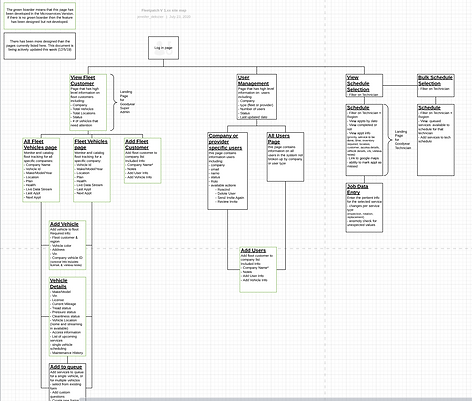
Wireframes
I then spent time ideating and creating low-fidelity wireframes. My goals were to make the grouping information prominent and easy to manage. Here are few examples of some key pages:


Testing
After I had the wireframes completed, I ran light usability testing. I printed out the wireframes and sat down with both users to have them walk through key flows in the paper prototype. The tasks we had them complete were:
-
filter the fleet management vehicle list to a single group of vehicles
-
create a new group of vehicles
-
find the groups attributed with a particular vehicle
After testing, I made a few key changes to the designs:
-
I made the option for creating new vehicles, more prominent by adding an 'edit' section on the vehicle details page
-
I changed how the groups were shown in the vehicle management align them more closely with other filters in the application
Finalize
With testing completed and final changes made, I was able to finalize the design of the UI for the fist pass at this feature. Here are some examples of the final UI design.


Mobile
This design is also something I worked to make fully responsive, so it could be accessed on all devices. For this feature there were a few specific elements I focused on to do that.
Mobile table:
The first and most pressing adjustment that needed to happen was how the table functions in mobile. This is because this design relies heavily on users interacting with the table to find vehicles and create groups. Previously, a user would just have to scroll to whatever column they were looking for. My research showed that users often found that difficult, especially with the first column being where the selection needed to happen and the information they were basing that decision off of many columns after that.
To address these issues there were a few changes implemented in the design for mobile:
-
I redesigned the table interaction, moving from open scroll to a tabbed approach allowing the user to ground themselves in where they are in the table
-
I re-ordered the columns and locked the first column so that users could select that vehicle for the group regardless of the column they were looking at

Mobile form:
The second main adjustment for mobile needed to happen in how the forms were displayed. The way the forms functioned on the larger format designs did not translate well to a smaller interactive format.
To make these forms usable on mobile I focused on two significant changes
-
I changed interactive elements to have much larger touch targets so that they would be easier to hit on a phone. Some elements look proportionately the same but the touch ratios around them requires much less accuracy from the user (ex: drop down selector)
-
I changed the design for the mobile modal to cover a larger section of the screen, rather than the relative percentage of the screen on desktop. This allows users to have a fuller, less cluttered view of the forms they are working with.

Next steps
Next steps for this feature would be to understand the groups our operations users create, establish a baseline for creating and managing groups, and ultimately understanding where I could improve upon this process.